


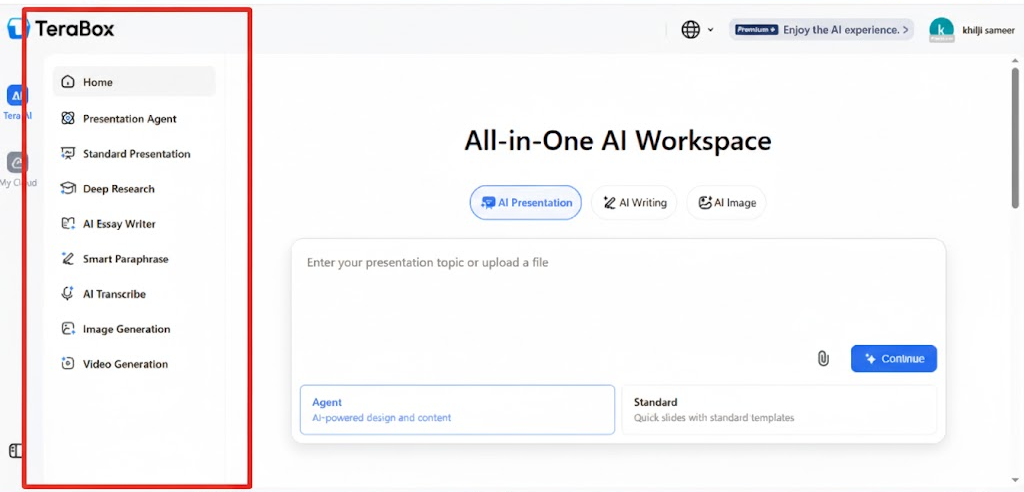
AI presentation creator has become one of the most helpful tools for students, teachers and professionals who need to build clean and organized slides without spending hours on design. TeraBox AI is becoming a popular choice because it focuses on speed, simplicity and easy slide creation. In just a few clicks you can generate a full presentation with titles, bullet points, layout suggestions and visuals.
This article will walk you through what TeraBox AI is how well it performs, its pros and cons and how it compares to other tools. Since the goal is to use an AI presentation creator that is simple enough for beginners yet strong enough for serious projects, TeraBox AI fits right in the middle reliable, fast and beginner friendly.
By the end you will know how to use the tool when it works best and whether it’s the right choice for your next presentation.
Part One: What Is TeraBox AI? A Comprehensive Review
A Clear Introduction to TeraBox AI
TeraBox AI is a cloud based tool that uses artificial intelligence to automatically create presentations. You don’t have to build slides from scratch just type in a topic, paste some text, or upload a document and TeraBox AI will instantly generate a complete outline and slide deck.
The interface is simple. You enter your topic, click generate and the tool builds the structure for you. You can edit the slides, change the style and rewrite sections or insert extra visuals.
Key Features That Make It Useful
- AI-powered slide creation that builds content automatically
- Clean and modern layouts you can customize
- Cloud-based system so you don’t need software installed
- Simple editing and design tools for beginners
- Good for fast drafts and last minute presentations
- Works as an online AI presentation creator for different devices
Whether you’re creating a school report, a business pitch or an informational slideshow the tool gives you a solid starting point within seconds.
Part Two: How Well Does TeraBox AI Perform in Creating Slides?
TeraBox AI is designed to make comfort. Instead of working from a blank page you can get organized text blocks, titles and layout suggestions . This makes the tool especially helpful for people who want to improve the quality of their slides without learning complex designs and techniques.
Speed and Convenience
One of TeraBox AI’s biggest strengths is speed. It can create a full outline and several slides in less than a minute. This is useful for:
- urgent assignments
- quick business updates
- brainstorming new ideas
- early drafts before fine-tuning
Slide Quality
The design is simple, clean and easy to read. While it may not match the advanced visual creativity of design focused tools, it gives you a solid foundation. You can adjust colors, change layouts and rewrite text to match your personal style.
Automatic Slide Design
The automatic slide design feature keeps spacing, alignment and formatting consistent. This helps your slides look professional without needing design experience. It is especially handy for users who struggle with layout or don’t know where to place text and images.
Who Will Benefit Most?
TeraBox AI performs best for:
- Informational slides
- Beginner-level designs
- Professional but simple decks
- Drafts that you will later polish
Overall, the tool does a good job of turning ideas into clear and readable slides.
Part Three: Pros and Cons of Using TeraBox AI for PPT Creation
TeraBox AI is super convenient, but it’s good to know both the advantages and limitations before you commit. Let’s talk deeply
Pros
- Beginner-Friendly Interface
- No design skills required. You don’t need to know PowerPoint shortcuts, slide formatting or font theory.
- The interface is simple you just type in your topic and the AI does the rest.
- Saves Tons of Time
- Imagine spending 1 to 2 hours crafting slides manually. TeraBox AI can generate a full deck in 5 to 10 minutes.
- Great for students crunched for deadlines or professionals needing fast client presentations.
- Automatic Slide Design
- Each slide is neatly aligned with professional-looking layouts.
- Even charts bullet points and images are automatically placed to look balanced.
- This is a huge time saver if you struggle with aesthetics or formatting.
- Cloud-Based Access
- No installation required you can works on any device with a browser.
- You can access your presentations from a laptop , tablet or smartphone.
- Quick Iteration and Drafts
- You can generate multiple versions of your slides in minutes.
- Useful when brainstorming different presentation structures or experimenting with design styles.
Cons
- Limited Customization for Advanced Designers
- While templates are neat you can’t fully customize every element.
- If you want unique slide animations, custom charts or advanced graphics, TeraBox AI might feel limiting.
- Sometimes Generic Content
- AI may produce generic bullet points or slide titles.
- You’ll still need to review and tweak the text to make it specific or compelling.
- Premium Features
- Some slide designs, icons or export options may require a paid upgrade.
- For casual users, the free version is often sufficient but heavy users might consider the subscription for advanced templates.
Mini Tip: Even with limitations TeraBox AI is perfect for most fast, professional presentations. Pair it with small tweaks (adding your own images or charts) for slides that feel original.
Part Four: Comparison: TeraBox AI vs. Other AI Presentation Tools
Let’s get more specific about where TeraBox AI stands compared to other popular AI presentation tools.
1. TeraBox AI vs Canva
- Canva: Fantastic for flashy visuals, advanced graphics and creative templates.
- TeraBox AI: Focuses on speed and automation perfect for people who want an online PowerPoint generator that quickly produces clean, structured slides.
- Verdict: TeraBox is faster; Canva is better for fully customized creative presentations.
2. TeraBox AI vs Beautiful.ai
- Beautiful.ai: Professional and heavy design , great for marketing decks.
- TeraBox AI: Prioritizes simplicity and quick turnaround. Even beginners can create slides in minutes without learning the tool.
- Verdict: Beautiful.ai is for advanced users and polished corporate slides TeraBox AI is better for fast , everyday presentations.
3. TeraBox AI vs PowerPoint Copilot
- PowerPoint Copilot: Integrated into Microsoft Office; good for users already in the Microsoft ecosystem.
- TeraBox AI: Fully cloud-based no Office subscription required works on any device.
- Verdict: If you need flexibility and device independence, TeraBox AI wins.
Key Strengths of TeraBox AI
- Speed — create a full deck in minutes.
- Ease of use — simple interface, beginner-friendly.
- Automatic slide design — neat, consistent layouts.
- Cross-platform access — work anywhere anytime on any device.
Mini Tip: For mixed use, some professionals even use TeraBox AI to generate the initial slide deck and then move it into Canva or PowerPoint for extra customization.
Part Five: Ideal Use Cases for TeraBox AI PPT
Here’s a detailed look at who benefits most from TeraBox AI and why.
1. Students
- Class presentations — Quickly convert notes or essays into slide decks.
- Group projects — Easy to share AI-generated slides with teammates.
- Research summaries — Automatically summarize long content into key bullet points.
Tip: Using multiple AI generated drafts helps you choose the best one and saves hours of discussion in group projects.
2. Teachers
- Lesson plans and slides — Generate structured slides for classes or workshops.
- Visual aids — Transform text heavy content into clear visuals for students.
- Workshops and training session — Quickly adapt slides to different audiences.
Pro Tip : Teachers can use automatic slide designs to make lessons look good without needing design skills.
3. Business Professionals
- Sales decks — Turn raw sales data into readable slides in minutes.
- Team updates and reports — Communicate metrics and progress clearly.
- Client presentations — Quickly create polished decks without hiring a designer.
Mini Tip: Combine TeraBox AI with charts from Excel or Google Sheets for more detailed visuals.
4. Content Creators
- Webinars and online courses — Convert scripts into slide decks.
- YouTube videos — Visualize video scripts or content outlines.
- Blog or course summaries — AI slides can turn text into engaging visual presentations.
Tip: Add screenshots or custom graphics after AI generation to make the slide unique.
5. Non-Designers / Casual Users
Even if you’ve never opened PowerPoint, TeraBox AI makes creating slides painless. It’s perfect for:
- Freelancers needing fast proposals
- Small business owners preparing client decks
- Anyone who wants professional slides without learning design software
Both give practical tips for using TeraBox AI effectively.
Conclusion
TeraBox AI is a great tool for anyone who wants quick, clean and easy to make slides. Whether you’re a student, teacher, content creator or working professional it helps you save time and get polished and professional looking presentations without the effort.
If you want to make PowerPoint slides quickly TeraBox AI is really helpful. It may not do fancy custom designs, but it’s great for fast, clean and easy presentations.
If you haven’t tried it yet, give it a try your slides could be ready in just minutes.